
12 min readUpdated

How to Choose a Time Tracker That Actually Gets You Paid

Most time trackers are built for teams. Here's what solo freelancers actually need — reviews of 6 popular tools and an honest comparison.

How to Choose a Time Tracker 
 That Actually Gets You Paid

The Real Problem with Most Time Trackers

You downloaded a time tracker to save time. Instead, you spend hours every month on admin work:

  1. Track time in app #1
  2. Export to spreadsheet
  3. Format and clean data
  4. Open invoicing app #2
  5. Copy-paste hours
  6. Calculate totals manually
  7. Send invoice
  8. Chase payment

Sound familiar? The gap between tracking time and getting paid is where freelancers lose money. A good time tracker should bridge this gap — not create more work.
6 Features Every Freelancer Time Tracker Needs

After testing dozens of tools and talking to hundreds of freelancers, these are the features that actually matter:

Multi-Currency Support

If you work with international clients, you need to track projects in different currencies and see totals in your home currency. Manual conversion is a recipe for billing errors.

Historical Rate Tracking

When you raise your rates, old projects should keep their original rates. A good historical rates feature keeps your past reports accurate so you can trust your billing history.

Mobile App

Sometimes you need to start a timer or check your hours on the go. A responsive web app works, but native mobile is better for quick access.

Integrations

If you live in Jira, Linear, or Notion, direct integration saves context-switching. Not essential for everyone, but a major time-saver if your workflow depends on these tools.

6 Popular Time Trackers Reviewed

We tested each tool from a solo freelancer's perspective — focusing on billing workflow, not team features.

1. Toggl Track

Great tracking, weak billing

For whom: Freelancers who use separate invoicing software
Pricing: Free / $9-18/month

Toggl is the most recognized name in time tracking, and for good reason — the core tracking experience is polished and intuitive. The browser extension works flawlessly, and the mobile apps are among the best in the category.

However, Toggl was built as a tracking tool first. If you need to actually bill clients, you'll find the invoicing features limited. Multi-currency? Not available. Historical rate tracking? Paid plans only. For freelancers who already use separate invoicing software (like FreshBooks or Wave), Toggl is a solid choice. For those who want an all-in-one solution, it falls short.

Pros

  • Excellent timer UX with one-click tracking
  • Strong reporting and analytics
  • 100+ integrations with project tools
  • Reliable mobile apps

Cons

  • No multi-currency support
  • Invoicing requires paid plan
  • Rate history only on paid tiers
  • Billing features feel like an afterthought
Chronum vs Toggl Track comparison

2. Clockify

Best free tracking, paid invoicing

For whom: Budget-conscious freelancers who don't need invoicing
Pricing: Free / $3.99-12.99/month

Clockify built its reputation on one promise: unlimited free time tracking. And it delivers — you can track unlimited hours across unlimited projects without paying a cent. The interface is clean, the desktop apps work well, and the calendar view is helpful for visual planners.

The catch? Everything beyond basic tracking costs money. Want to send an invoice? $7.99/month. Multi-currency? $11.99/month. Historical rates? Same. Clockify essentially gives you free tracking to get you in the door, then charges for the features that actually help you get paid. If you're on a tight budget and already have invoicing covered, Clockify's free tier is hard to beat. Otherwise, the paid tiers add up quickly.

Pros

  • Unlimited free tracking for unlimited users
  • Generous free tier features
  • Desktop apps for all platforms
  • Calendar view for visual planning

Cons

  • Invoicing requires paid plan ($7.99+)
  • Multi-currency requires paid plan
  • Rate history requires paid plan
  • Free tier is tracking-only
Chronum vs Clockify comparison

3. Harvest

Full-featured, team-focused

For whom: Freelancers who might grow into a team
Pricing: Free (1 project) / $11/month

Harvest is one of the oldest names in time tracking and invoicing, and it shows — in both good and bad ways. The product is stable, well-documented, and integrates with practically everything. Multi-currency works out of the box, and the invoicing features are genuinely useful.

The downside for solo freelancers: Harvest is built for teams. You'll navigate through team-oriented features you don't need. Worse, when you change your hourly rate, Harvest updates all your historical data — past reports suddenly show new totals, which can cause billing confusion. At $11/month for a single user (after the very limited free tier), it's priced for agencies, not independent freelancers.

Pros

  • Mature, stable product with years of development
  • Strong invoicing with payment processing
  • Multi-currency support included
  • Good integrations ecosystem

Cons

  • No historical rate tracking
  • Interface designed for teams, not solo users
  • No batch invoicing
  • $11/month feels steep for solo use
Chronum vs Harvest comparison

4. Bonsai

Full business suite, overkill for tracking

For whom: Freelancers who want contracts, proposals, and accounting in one place
Pricing: $9-49/month

Bonsai isn't really a time tracker — it's a complete freelance business suite that happens to include time tracking. Contracts, proposals, client CRM, expense tracking, accounting, tax estimates — it's all there. If you want one app to run your entire freelance business, Bonsai is compelling.

The problem? Most freelancers don't use 80% of these features. The contract templates sit untouched. The CRM stays empty. The accounting duplicates what your accountant already handles. You're paying $9-49/month for features you'll never open. If your main need is "track time, send invoice," Bonsai is significant overkill.

Pros

  • All-in-one: contracts, proposals, invoicing, accounting, taxes
  • Professional contract templates
  • Built-in expense tracking
  • Tax estimation features

Cons

  • No free tier
  • Time tracking is secondary to other features
  • Complex interface with many unused features
  • Multi-currency only on higher tiers
Chronum vs Bonsai comparison

5. TMetric

Solid features, team-oriented UX

For whom: Small teams or freelancers who work with agencies
Pricing: Free / $7-9/month

TMetric is a capable time tracker with some features that competitors charge extra for — multi-currency, rate history, and automatic exchange rates are all available. The visual timeline is genuinely useful for seeing how you spent your day.

The challenge for solo freelancers: TMetric's interface constantly reminds you it's built for teams. You'll see team member lists, workspace permissions, and employee activity monitoring features. As someone who works alone, you're navigating around features designed for managers overseeing employees. The tool works, but you'll always feel like you're using a team product solo.

Pros

  • Multi-currency included
  • Historical rate tracking
  • Auto exchange rates
  • Visual timeline view

Cons

  • Interface built for team management
  • Solo users navigate around team features
  • Invoicing only on paid plans
  • Employee monitoring features feel surveillance-y
Chronum vs TMetric comparison

6. Kimai

Powerful and free, setup required

For whom: Technical freelancers who enjoy self-hosting
Pricing: Free (self-hosted)

Kimai is the open-source option that developers love. It's genuinely free — not "free tier" free, but actually free. You get multi-currency, rate history, batch invoicing, and extensive customization through plugins. For technical freelancers who value data ownership, it's ideal.

The cost isn't money — it's time. You need a server (or VPS), a database, and the knowledge to set it all up. Then you're responsible for backups, security updates, and maintenance. If you enjoy that kind of work, Kimai is rewarding. If you just want to track time and bill clients without becoming your own IT department, the hidden costs of "free" add up quickly.

Pros

  • Completely free and open-source
  • Full control over your data
  • Multi-currency and rate history
  • Highly customizable with plugins

Cons

  • Requires server setup and maintenance
  • Database backups are your responsibility
  • No official mobile app (third-party or PWA only)
  • Updates require manual installation
Chronum vs Kimai comparison

Full Feature Comparison

Side-by-side comparison of all features across 7 time tracking tools.

Complete feature comparison of Chronum vs Toggl, Clockify, Harvest, Bonsai, TMetric, and Kimai
FeatureChronumTogglClockifyHarvestBonsaiTMetricKimai
PricingFree (beta)Free / $9-18Free / $3.99-12.99Free solo / $11+$9-49Free / $7-9Free / €3.99+
Time TrackingLive timerYesYesYesYesPaidYesYes
Manual entryYesYesYesYesPaidYesYes
Backdated live timerYesNoNoNoNoNoNo
Visual timelineYesYesCalendarNoNoYesNo
Time roundingPer-projectIn reportsPaidYesPaidPaidYes
BillingMulti-currencyYesNoPaidYesPaidYesYes
Project ratesYesPaidYesYesPaidPaidYes
Task ratesYesPaidPaidYesNoNoYes
Historical ratesYesPaidPaidNoYesYes
Auto exchange ratesYesNoNoNoNoYesNo
InvoicingPDF invoicesYesPaidPaidYesPaidPaidYes
Live previewYesYesPaidEmailPaidPaidYes
Invoice templatesYesNoNoSinglePaidNoYes
Batch invoicingYesNoNoNoNoNoYes
Recurring invoicesSoonNoPaidYesPaidNoNo
ReportsPDF/CSV exportYesYesYesYesPaidYesYes
Saved reportsYesYesPaidYesPaidNoYes
Advanced metricsYesPaidPaidPaidPaidPaidLimited
PlatformmacOS DesktopYesYesYesYesNoYes3rd party
Windows DesktopYesYesYesYesNoYes3rd party
Linux DesktopYesNoYesNoNoYes3rd party
Web appYesYesYesYesPaidYesYes
Command paletteYesNoNoNoNoNoNo
Mobile appSoonYesYesYesPaidYesYes
Browser extensionNoYesYesYesYesYesNo
IntegrationsSoonYesYesYesPaidYesAPI
ExtrasTeam featuresNoYesYesYesPaidYesYes
Open sourceNoNoNoNoNoNoYes

. Features and pricing may change.

How to Choose: Quick Decision Guide

Answer these questions to find your best match:

Do you bill in multiple currencies?

Yes, I have international clients
Choose Chronum, Harvest, TMetric, or Kimai. Toggl and Clockify don't support multi-currency (Clockify charges extra).
No, single currency only
Any tool works. Prioritize other features.

Do you change your rates periodically?

Yes, and past data must stay accurate
Choose Chronum, TMetric, or Kimai — they preserve historical rates. Harvest overwrites history; Toggl/Clockify charge extra.
Rarely or never
Historical rates matter less. Focus on invoicing features.

Do you need built-in invoicing?

Yes, I want tracking and billing in one app
Choose Chronum, Harvest, or Kimai. Toggl/Clockify/TMetric charge extra for invoicing.
No, I use separate invoicing software
Toggl or Clockify's free tiers are excellent for pure tracking.

What's your budget?

Free is essential
Chronum (free during beta), Clockify (free tracking), or Kimai (free self-hosted). Note: Clockify charges for invoicing.
$5-15/month is fine
All tools are within budget. Choose based on features.

Do you need mobile apps?

Yes, native mobile is important
Toggl, Clockify, Harvest, or TMetric have mature mobile apps. Chronum and Kimai are web/desktop focused.
Desktop-first is fine
Chronum or Kimai offer strong desktop experiences without mobile dependency.

Will you ever need team features?

Maybe, if I grow
Harvest or TMetric scale to teams. Chronum is solo-only by design.
No, I work alone
Chronum is built specifically for solo freelancers — no team overhead.

Where Chronum Fits

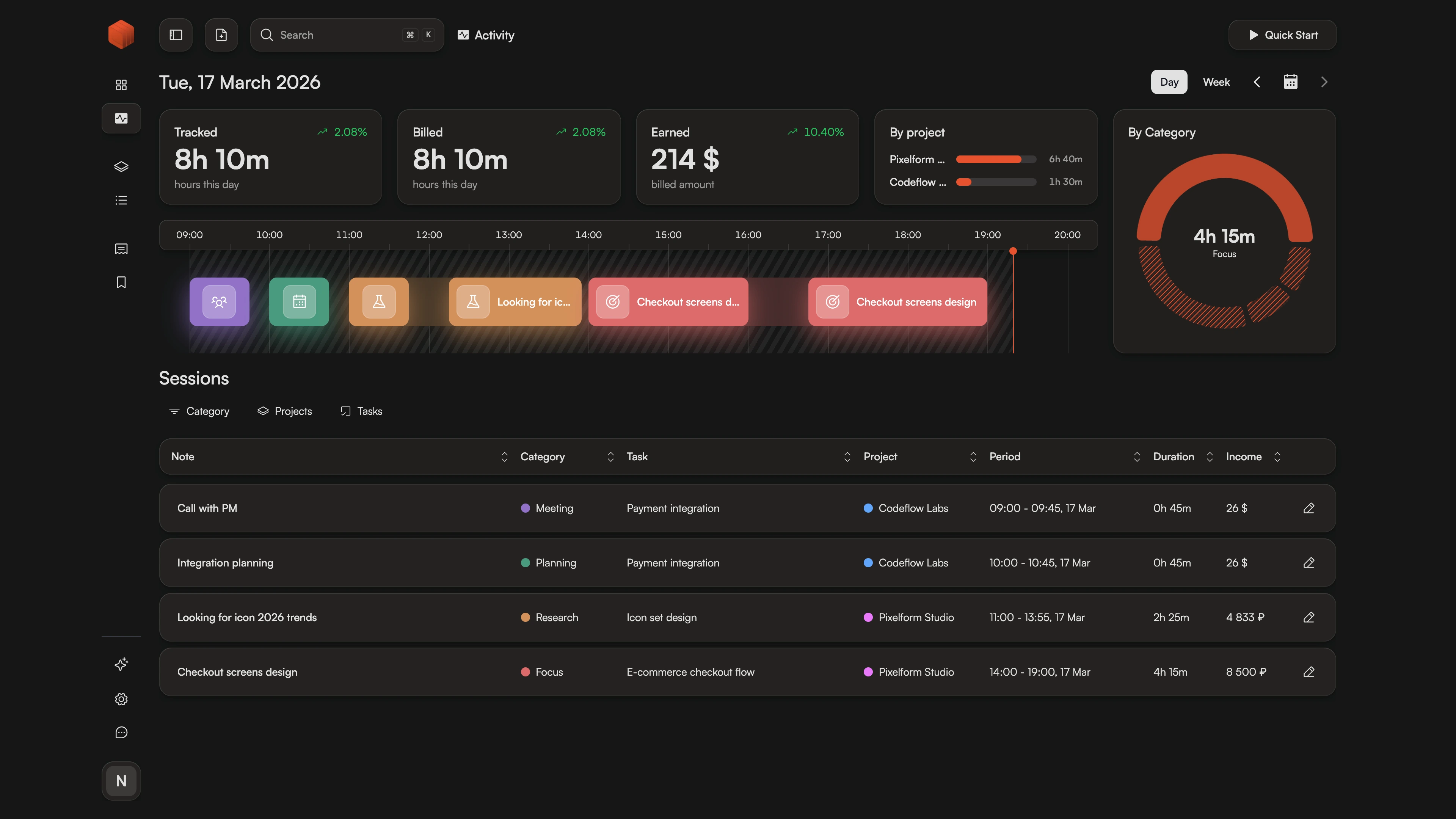
Chronum visual timeline showing time tracking sessions across the day

After years of using fragmented tools — one for tracking, another for invoicing, spreadsheets for everything else — we built what we wanted to use ourselves.

Chronum is designed for solo freelancers who bill hourly. We focus on the core workflow: track time, generate invoices, get paid . Multi-currency, historical rates, and batch invoicing are built in — not paid add-ons.

What we don't have (yet): native mobile apps and integrations are on the roadmap. Team features? Not planned — we're intentionally solo-focused. If you need team management, Harvest or TMetric are better fits.

5 of 7 essential features
See detailed Chronum comparisons

Frequently Asked Questions

Ready to simplify your billing?

Track time. Generate invoices. Get paid. One app, no spreadsheets, no extra tools.